Comparison
Drag-and-drop vs automatic seating charts
What manual seating tools do well, where they break at 150 guests, and what a solver changes.
Updated
Drag-and-drop seating tools are a fair place to start. You get a room, some circles and a list of names, and you move people around until it looks right. For a small wedding that works. For a big one, it is fun for an hour, and then it becomes a second job.
This guide is for the couple who is partway through that job. It covers what manual tools do well, where they stop helping, what automatic seating does differently, and when you should stay manual. It names no tools, because the difference is a method, not a brand.

What drag-and-drop tools do well
Give them their due. A manual board shows you the whole room at once, and moving a name is immediate and satisfying. You keep total control, and nothing surprises you, because nothing moves unless your hand moves it.
That control is worth a lot when the chart is small, when the room is unusual, or when you already know exactly who sits where and only need a place to draw it. A drag-and-drop board is a good notebook.
Where they break
The trouble is that a notebook does none of the thinking. Three things go wrong as the list grows.
- 1
Every guest is placed by hand. At 150 guests that is 150 decisions before you have even looked at a rule. Households have to be kept whole, friend groups pulled together, and every table counted against its seats, all by eye.
- 2
Every RSVP change is redone by hand. A decline leaves a hole. A plus-one adds a person. Each change means finding the gap, moving a household to fill it, and checking that the move did not push someone else somewhere they should not be.
- 3
Nothing checks conflicts. A board will happily seat two people at the same table when you swore they would never be. It has no idea they are meant to be apart, so the only checker is you, rereading the chart late at night and hoping you looked at every table.
Drag-and-drop and automatic seating, side by side
| Situation | Drag and drop | Automatic |
|---|---|---|
| Who places guests | You, one at a time | The solver, from your list |
| Keep-apart pairs | You remember them | Written once as a rule and enforced |
| Keep-together groups | You drag each person | Households and groups stay whole |
| A guest declines | Find the hole, shuffle by hand | Solve again; few guests move |
| Two rules cannot both hold | You find out at the venue | It tells you which rule and why |
| Best for | Small rooms, settled plans | Big lists that keep changing |
What automatic seating does
An automatic seating chart flips the order of work. You describe the room and the relationships, and the software does the placing. In Tablecharm that means three ideas.
- Rules, not placement. You write who must be kept apart and who must be kept together. Set a keep-apart to "Absolutely must" and the pair is never put at one table. A household written on one line stays whole, and a keep-together rule holds a group at one table.
- A solve that re-runs. When the list changes you press Solve again. The re-solve moves as few guests as it can and tells you what moved, so tables you have already told your parents about stay put. You can also lock a table you are happy with.
- Conflicts checked. Every solve checks the rules against the tables. If two rules cannot both be true, for example a group of twelve and a table of ten, it says so plainly instead of quietly breaking one.
A worked example: 150 guests, 5 keep-apart pairs
An illustration, not a case study. The numbers below are arithmetic on a made-up wedding.
Picture 150 guests in about 19 tables of eight, with five pairs who must never share a table: two divorced parents, an ex and the person who broke up with them, and three more you know about.
Placed by hand. You drag 150 names into 19 tables. Any two given guests have roughly a 5 percent chance of landing at the same table if you place people by group and comfort alone, since one guest has seven table-mates out of the other 149. With five pairs, the chance that at least one pair ends up together is about one in five. So you finish, then read all 19 tables looking for the five pairs. Then nine people decline and two add a guest. Each change means moving a household, and each move is another chance to put a pair together, so you read all 19 tables again.
Solved. You paste the list, add the five keep-apart rules once, set to "Absolutely must", and press Solve. The rules are checked in the solve, so no pair shares a table. When the eleven changes come in you update the list and solve again. The rules did not change, so you are not rereading 19 tables for five names. You check what moved.
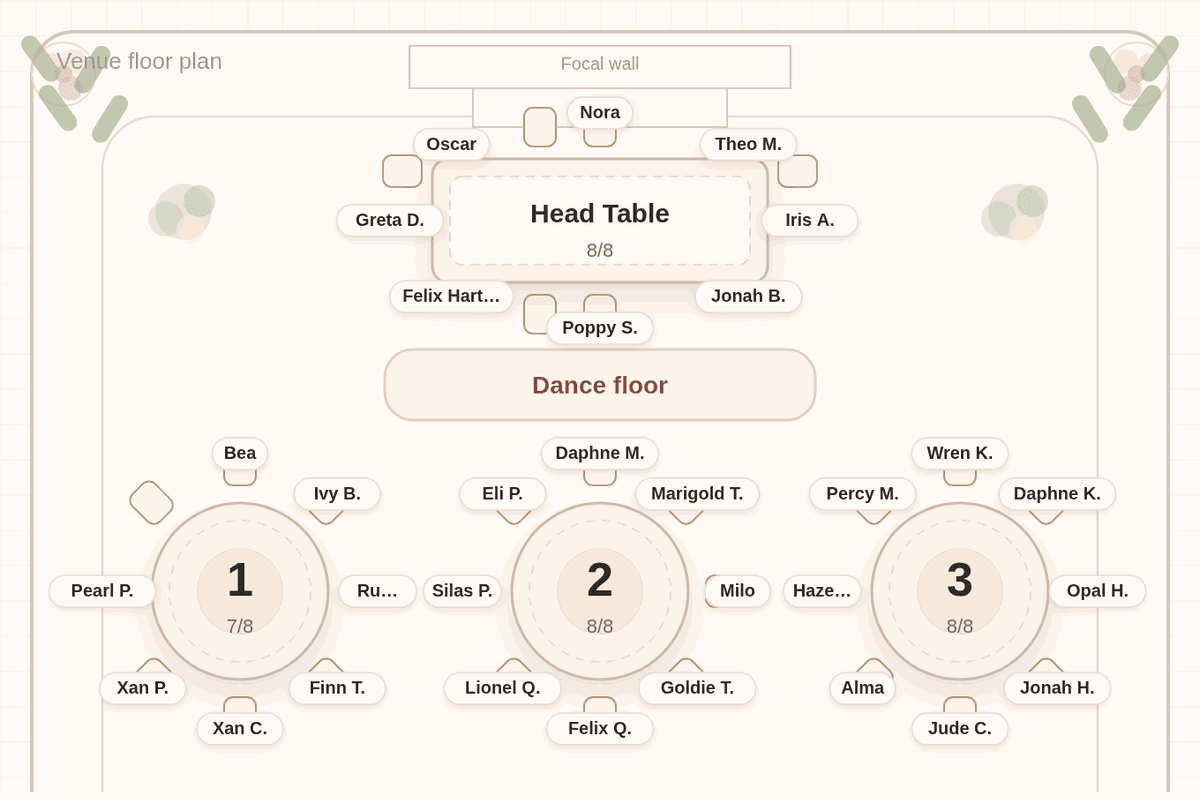
The chart below is a real solved 150-guest chart from our seating guide, showing the head table and the first three rounds, each table whole.
When manual is fine
Stay with drag and drop if your list is under about forty guests, if you have only a couple of tables, or if your plan is settled and you only need to draw it. With few tables and few conflicts you can hold the whole chart in your head, and a board is quicker than writing rules.
Switch when the chart stops fitting in your head. The signs are a list past a hundred guests, more than two or three keep-apart pairs, and RSVPs still arriving. By then the time is going on re-checking, not on deciding.
How Tablecharm works, in 3 steps
- 1
Paste your list
One household per line. Add +1 after a guest who is bringing someone and (kid) after a child. Or import a CSV.
- 2
Add your rules
Keep two guests apart, or keep a group together, and set your table sizes. Write each rule once.
- 3
Solve, read, re-solve
Press Solve and read the chart like a guest would. When a reply changes, solve again. Pay only when the chart is right.
Free to try. $29 once, only when it's right. 7-day refund.
Questions couples ask
What is an automatic wedding seating chart?
It is a chart where software places the guests for you from your list, table sizes and rules such as keep apart and keep together. You review the result and adjust it instead of building it from scratch.
Can I still move guests by hand after it solves?
Yes. The solve is a first draft you can drag around. You can lock a table you like, so the next solve leaves it alone.
How do I keep two people apart at a wedding?
Pick the two guests and choose Keep apart. Set it to "Absolutely must" and Tablecharm never seats them at one table. It tells you if a set of rules makes that impossible.
What happens when a guest declines after I solved?
Remove the guest and solve again. The re-solve moves as few people as it can and shows you what moved.
What does Tablecharm cost?
It is free to try. Unlocking one wedding is $29 once, only when the chart is right, with a 7-day refund.
Let the rules do the checking
Try a sample list first, or paste your own. The editor and solver are free, and every table stays readable in preview.
Useful next
- Seating chart for 150 guests: the chart in this guide, in full
- Seating before the RSVPs are in: how to start a draft early
- Seating an ex at a wedding: keep-apart rules in practice
- Seating chart generator: what happens when two rules conflict